MicroSD Express Cards for Nintendo Switch 2: How to Choose Compatible Storage in 2026
Expanding Nintendo Switch 2 storage in 2026 requires more attention than simply buying a high-capacity memory card. Unlike the original Switch, the newer console supports microSD Express cards for storing downloaded games, updates and downloadable content. Standard microSD cards, including many expensive high-speed models, cannot perform this role. Choosing the right card means checking its actual storage standard, understanding how much space your games need and knowing which specifications matter. A suitable purchase can prevent wasted money, installation problems and the inconvenience of replacing an undersized card after only a few months.
Why Nintendo Switch 2 Requires microSD Express Cards
Nintendo Switch 2 comes with 256 GB of internal storage, although some of that capacity is reserved for system functions. This is considerably more than the 32 GB available in the original Nintendo Switch or the 64 GB in the OLED model. Nevertheless, modern game downloads, additional content and software updates can consume the available space surprisingly quickly. Players who frequently purchase digital games may find themselves managing storage long before their collection becomes particularly large. Nintendo supports expansion through microSD Express cards with capacities of up to 2 TB, allowing owners to keep substantially more software installed without repeatedly deleting older titles.
The important difference is the technology used to transfer data. Conventional microSD cards generally rely on the UHS interface, while microSD Express supports a faster connection based on PCI Express and NVMe technology. These names may sound complicated, but their practical purpose is straightforward: allowing the console to access stored game files more quickly. Nintendo selected the newer standard to meet the demands of Switch 2 software. A traditional microSDXC card advertised with impressive speeds or premium gaming branding cannot replace microSD Express because the required interface is different. Compatibility depends on the card’s actual standard, not its advertised performance alone.
The new requirement also affects players upgrading from an earlier Switch. A 512 GB or 1 TB microSDXC card that worked perfectly with the original console cannot be reused for installing games on Switch 2 unless it supports microSD Express. Even Nintendo-branded cards released for the previous generation may be unsuitable. There is one useful exception: Nintendo Switch 2 can import screenshots and recorded videos from an older Switch microSD card into its internal memory. This does not make that card compatible with game storage. Anyone moving to the newer console should therefore check their existing card before assuming it will provide additional capacity.
How to Recognise a Genuine microSD Express Card
The simplest identification method is to look for the microSD Express designation and the distinctive EX marking on the memory card or its packaging. Retail product descriptions should explicitly identify the supported standard rather than simply listing microSD, microSDHC or microSDXC. The latter terms mainly describe card families and capacity ranges; they do not establish Express compatibility. Likewise, specifications such as U3, V30, A2 or UHS-I are not proof that a card supports Switch 2. These markings may appear on perfectly good conventional cards, but none of them replaces the required EX standard.
Licensed Nintendo Switch 2 accessories can make purchasing easier because their compatibility is clearly identified. The Samsung microSD Express Card for Nintendo Switch 2 and Nintendo-licensed SanDisk microSD Express products are examples of cards designed for the console. However, official Nintendo branding is not mandatory. Nintendo states that any genuine microSD Express card meeting the standard and remaining within the supported 2 TB capacity limit can be used. This gives buyers more flexibility when comparing manufacturers. The essential checks are the exact model name, the Express specification and reliable evidence that the product being sold matches its description.
Online listings deserve particular care because sellers sometimes combine reviews or product variations for different types of memory cards. A page advertising a SanDisk or Samsung product might offer conventional microSDXC and microSD Express versions through separate selections. Before purchasing, inspect the selected capacity, full product title and photographs of the actual packaging. Avoid listings that use phrases such as ‘Switch compatible’ without identifying the console generation. Extremely cheap, unusually large cards from unfamiliar sellers also deserve suspicion, as counterfeit storage products can report misleading capacities. Buying from a reputable retailer with a clear returns policy is generally safer than relying on a familiar brand name displayed in an unreliable listing.
Choosing the Right Capacity and Performance for Your Games
For many Switch 2 owners, capacity will influence everyday convenience more than small differences between advertised transfer speeds. A 256 GB microSD Express card provides a useful starting point for someone who buys occasional digital games and mainly collects physical releases. It adds substantial storage without requiring the cost of a particularly large card. However, the space available after formatting will be lower than the advertised figure, and game updates can increase storage requirements over time. A player who regularly installs major releases may eventually need to remove older downloads to make room for new purchases.
A 512 GB card is often a sensible middle ground for players building a varied digital library. It provides room for several large titles alongside smaller independent games, additional content and future updates. A 1 TB model becomes more attractive for households sharing a console, players who regularly purchase digital releases or anyone who dislikes managing downloads. Larger cards can also be practical when internet connections are slow or subject to data limits, since deleting a game may mean downloading a substantial amount of data again later. These recommendations describe likely usage patterns rather than fixed rules: actual storage needs depend on the games installed.
When calculating capacity, look at the download sizes listed for games you intend to purchase rather than estimating from their genre or physical appearance. A physical game card does not always contain all the data needed to play. In particular, Switch 2 game-key cards provide access to downloadable game software rather than storing the complete game themselves, so adequate console storage is still necessary. Updates and downloadable expansions can add further requirements. It is worth leaving free space for new releases instead of filling the card completely. Purchasing a larger card initially may be more economical than replacing a smaller one shortly afterwards, provided the additional capacity will genuinely be used.
Do Read and Write Speeds Make a Noticeable Difference?
MicroSD Express products often advertise maximum read speeds measured in hundreds of megabytes per second. For example, Samsung specifies a sequential read speed of up to 800 MB/s for its 256 GB Nintendo Switch 2 microSD Express card under supported test conditions. Such figures describe potential performance rather than guaranteed game-loading results. Actual speeds depend on the card, the console, the files being accessed and the task being performed. A card advertised with a higher maximum speed will not necessarily make every game start noticeably faster. Once the required Express standard is satisfied, capacity, reliability and price may provide greater practical value than chasing the highest number on the packaging.
Read speed concerns how quickly stored information can be accessed, while write speed affects operations such as transferring, installing or updating data. Both matter, but manufacturers often highlight favourable results obtained during controlled tests. It is difficult to translate these figures directly into seconds saved during normal gameplay. Players should also distinguish between sequential speeds and the performance of smaller, scattered file operations. The console’s software and storage handling influence the final experience. Independent tests using the same Switch 2 games and comparable conditions are more useful than comparing specifications from unrelated manufacturers, although differences reported by reviewers should not be treated as universal results.
Price comparisons are most useful when made between genuine cards of similar capacity from established manufacturers. Divide the selling price by the advertised gigabytes to estimate the cost per GB, then consider warranty coverage and seller reliability. A cheaper 512 GB card may offer better long-term value than an expensive 256 GB model with a higher claimed peak speed. At the same time, paying extra for storage that will remain unused is unnecessary. Nintendo-licensed cards offer clear compatibility reassurance, while appropriately specified third-party alternatives can provide another reasonable option. Buyers should check current availability and retailer details, since prices and product ranges can change considerably throughout 2026.
Installing microSD Express Storage and Avoiding Compatibility Problems
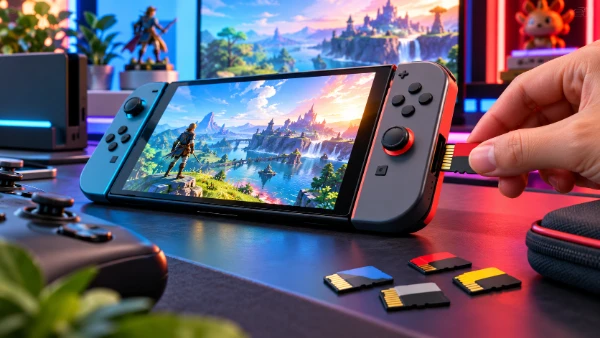
Before inserting a new card, completely switch off Nintendo Switch 2 rather than leaving it in Sleep Mode. Hold the POWER button for at least three seconds, select Power Options and then Power Off. Open the stand on the back of the console to access the microSD Express card slot. Position the card with its label facing away from the console and gently push it into the slot until it clicks. Never force a card that does not slide into place correctly. After switching the console back on, follow any instructions displayed. Nintendo requires an internet-based system update when a microSD Express card is used for the first time, so an internet connection may be necessary before the new storage becomes available.
Once recognised, the microSD Express card becomes the default destination for newly downloaded software. Nintendo Switch 2 can also store software updates, downloadable content, screenshots and captured videos on compatible external storage. Existing downloadable software can be moved between system memory and the card using the console’s data-management functions. Game save data follows a different rule: it remains in the console’s internal memory and cannot be moved or copied to a microSD Express card. This distinction is important when replacing storage, as transferring installed game files is not the same as transferring progress. A card should never be treated as a complete backup of everything stored on the console.
If a card is not detected, start with the simplest checks rather than immediately assuming it is defective. Confirm that the packaging specifically says microSD Express, check that the capacity does not exceed 2 TB and make sure the console has completed the required system update. Fully power off the device, remove the card and insert it again in the correct orientation. Inspect the card for visible damage, but avoid touching its metal contacts or attempting repairs. If the problem continues, testing it with equipment that specifically supports microSD Express may help identify a faulty product. A conventional card reader may not provide full Express functionality. Persistent problems with several known-working cards could indicate a console issue requiring Nintendo support.
Moving Games to a Larger Card Without Losing Progress
Upgrading from a smaller microSD Express card requires some preparation, especially when the original is nearly full. Nintendo recommends using one card rather than regularly switching between several. Before changing storage, check the Data Management section of System Settings to see which games occupy the most space. You can move supported downloadable software between the card and internal storage, subject to available capacity. For a larger collection that cannot fit internally, Nintendo provides a process for copying card data to another microSD Express card using suitable computer equipment. Follow its official transfer instructions rather than assuming that every ordinary USB card reader supports the newer storage standard.
Keep the original card until you have verified that the replacement is recognised and the expected software is accessible. If transferring the installed games is inconvenient, previously purchased digital software can generally be downloaded again through the appropriate Nintendo Account and the console’s supported software-management options. Large downloads may take time and require a reliable internet connection, so plan the change accordingly. Importantly, replacing the microSD Express card does not remove game save data stored in the console’s internal memory. Nevertheless, checking the available save-data backup or transfer options before making broader changes to the console is sensible, particularly for games containing substantial progress.
Good storage management can postpone the need for another upgrade. Archive or delete software you no longer play, review large updates and monitor free capacity before purchasing new games. Nintendo allows previously purchased downloadable games to be downloaded again, although access remains subject to the relevant account and software availability. Keep the card installed during downloads and gameplay, and always shut down the console before removing it. Store unused cards in protective cases to reduce the risk of physical damage or loss. For most buyers in 2026, a genuine 512 GB microSD Express card offers a practical balance between capacity and expense, while 1 TB is worth considering for larger digital collections. Whatever the size, verified compatibility should remain the first purchasing requirement.